 gui_toolkit
Drawing: transforms, clips, images and effects
The draw package is the immediate-mode layer under ui: you can also use it on its own (see examples/smoke,
examples/transforms and examples/effects). This page covers the 2D transforms, the clips and the images added in
0.4.0, the layers (group opacity) and offscreen rendering added in 0.4.1, the effects added in 0.5.0 (filters,
blend modes, backdrops, ellipse and polygon clips), the blend spaces added in 0.6.0, and the retained pictures,
gradients, box shadows and device-loss recovery added in 0.7.0.
Affine transforms
Affine :: struct { a, b, c, d, e, f: f32 }

//   x' = a*x + c*y + e
//   y' = b*x + d*y + f
The convention is the one of CSS matrix(a, b, c, d, e, f), canvas setTransform and SVG, so a CSS matrix goes in
as is: draw.Affine{a, b, c, d, e, f}. Screen space is y-down: a positive angle turns clockwise on screen, as CSS
rotate() does.
| Proc | Meaning |
|---|---|
AFFINE_IDENTITY | identity |
affine_mul(m, n) | m after n: apply(mul(m, n), p) == apply(m, apply(n, p)). CSS transform: t1 t2 is mul(t1, t2) |
affine_translate(t), affine_scale(s: Vec2), affine_rotate(radians), affine_skew(ax, ay = 0) | constructors (CSS translate, scale, rotate, skew) |
affine_around(m, origin) | m around origin (CSS transform-origin) |
affine_apply(m, p), affine_apply_vector(m, v) | point / direction |
affine_inverse(m) -> (Affine, ok) | inverse; ok = false when singular (zero scale) |
affine_bounds(m, r) -> Rect | axis-aligned bounds of a transformed rect |
affine_determinant, affine_scale_factor, affine_is_identity, affine_is_scale_translate | queries |
The transform stack
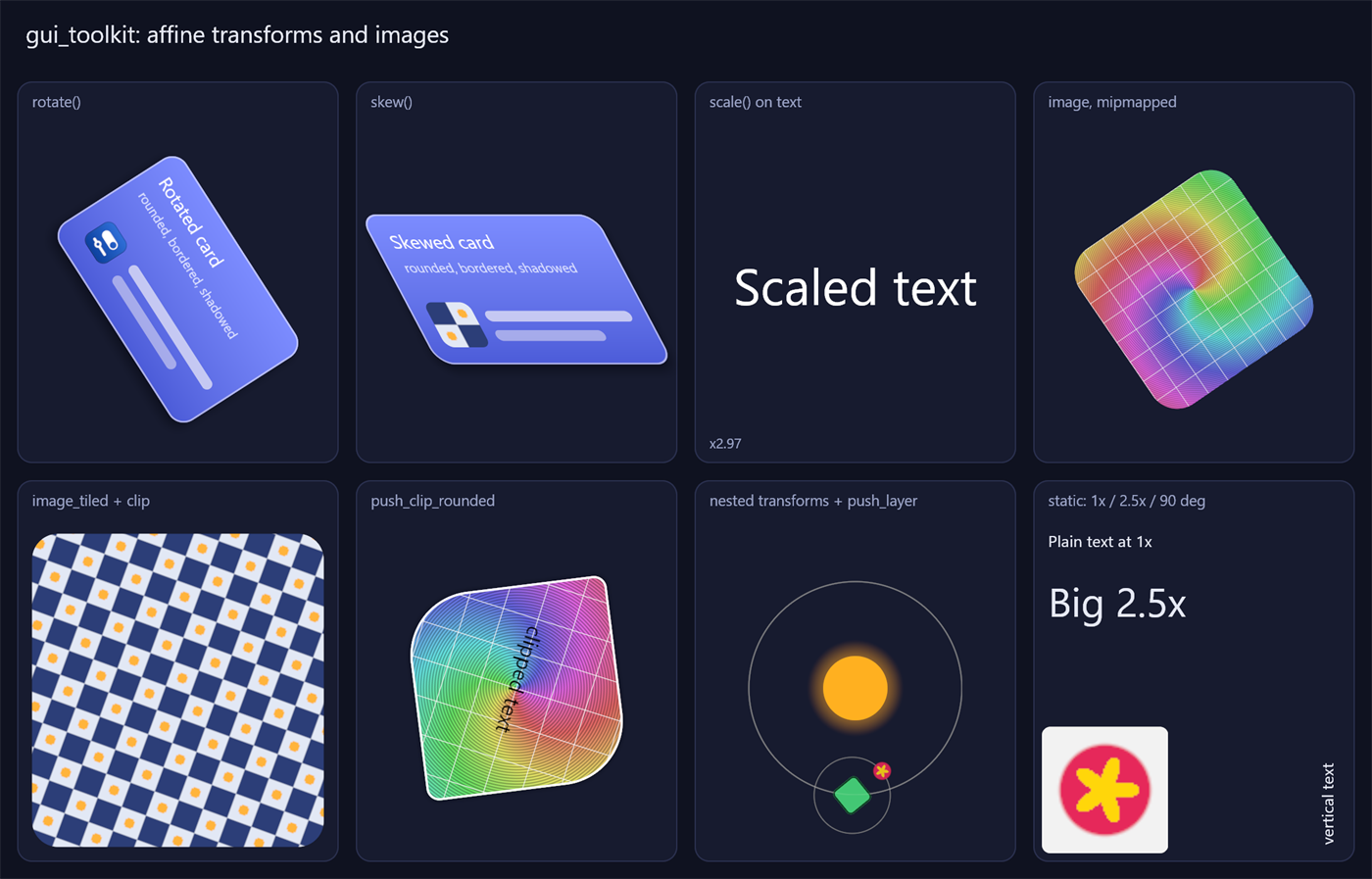
draw.push_transform(dc, draw.affine_around(draw.affine_rotate(0.3), draw.rect_center(card)))
draw.rect(dc, card, color, 12)            // rounded corners, border, shadow: all rotate
draw.text(dc, font_id, 15, pos, white, "Rotated")
draw.image(dc, tex, icon_rect, radius = 6)
draw.pop_transform(dc)
push_transform(dc, m): what is drawn next goes throughmfirst, then through the transforms already pushed (nesting like CSS stacking contexts: a child's screen transform isparent * child).pop_transform(dc)pops one level.pop_xformis the same proc (kept forpush_scale).push_scale(dc, center, s)is unchanged: scales around a screen point, on top of the current transform.current_transform(dc)returns the local-to-screen matrix;affine_inverseof it maps a mouse position into the local space (hit testing).
Everything draw draws follows the transform: rects (rounded, per-corner radii, borders, soft shadows), per-corner
gradients (rect_corners), text and images. Sizes given in local units (radius, border, shadow softness) scale with
it.
How it is drawn
- Uniform scale + translation (no rotation or skew): baked on the CPU into the instance, as before. This is the
path of
push_scaleand of everything drawn without a transform; its output is pixel-identical to 0.3 (except that the blur of soft shapes now scales with them). - Anything else: the matrix goes once per pushed level into a per-frame table (a structured buffer); each
instance carries its index (
Rect_Inst.xform). The vertex shader transforms the 4 corners and grows the quad by one screen pixel; the pixel shader evaluates the rounded-rect distance in local space and divides it by its screen-space rate of change (derivatives of the local position, exact for an affine map). Edges keep a 1 px antialiased ramp under rotation, skew and non-uniform scale. - Text is laid out at its nominal size (so
font.text_widthstill measures it), but when the transform scales it by more than 10 % the glyphs are rasterized at the on-screen size (TEXT_RASTER_TOLERANCE): scaled text stays sharp. Under scale + translation the glyphs also snap to the pixel grid (at subpixel positions, see text.md). Rotated text at its layout size is placed at the same subpixel positions in local units and samples the atlas bilinearly. Text is drawn from shaped glyph runs (draw.glyph_run;draw.textshapes then calls it).
Planes: projected layers (3D transforms)
draw.push_plane(dc, bounds, raster_scale, fx) opens an offscreen layer over bounds (the plane frame: the current local space) and replaces the transform stack by the map from the plane frame to the layer's texels, so what is drawn until pop_plane is rasterized crisp at raster_scale texels per unit whatever happens to the plane later. pop_plane closes it and returns a Plane_Layer; draw_plane(dc, layer, m, alpha, opts) composites it through m (a Mat4, column-major like CSS matrix3d(): plane frame to the current local space, z dropped after the divide by w). pop_plane_draw does both. The quad is clipped against w > 0 by the rasterizer and sampled with perspective-correct interpolation (anisotropic along the long axis of the pixel's footprint), its edge antialiased from the plane's own coordinates; the clips and alpha stack of the moment apply.
Preserve-3d: pop several planes and give them to draw_planes(dc, items) (plane_item(layer, m, alpha, opts, cull) makes an item). It draws them in the order they hide each other: a plane wholly on the viewer's side of another's plane after it, else the depth of the middles, then paint order. Planes that cut through each other (or hide each other in a cycle) have no such order: they are split along each other's planes into convex pieces by a BSP, as Chromium's BspTree does, ordered back to front for a viewer in front, and each piece is the same layer drawn again with the cuts that bound it (Plane_Draw.cuts: half-spaces n . (x/w, y/w, z/w) + d >= 0 of the space after the divide, tested per pixel on the interpolated plane position, up to MAX_PLANE_CUTS per draw: a piece bounded by more cuts is divided in two along a chord between two of its corners, repeatedly, so no cut is ever dropped; the pieces fit without a seam or an overlap, their cut edges are hard as Chromium's). An item can have several parts (the layer of a plane and flat things that ride on it: they share its plane, so they are cut and ordered with it). A plane whose content is unchanged is kept: give Plane_Fx{cache_id, cache_key} (the key signs what is drawn in the plane, not its matrix); push_plane returns false when the kept texture is still good and the caller skips its drawing; moving the plane then costs one instance. Plane_Draw.cull_back hides a plane seen from behind (the orientation of its projected rect). Not recorded in pictures.
Effects on the composite (Plane_Draw): blend (mix-blend-mode of the projected quad against what is under it: the quad's screen area becomes an ordinary layer, push_effects), backdrop (backdrop-filter: what lies under the quad is captured, filtered in screen space with lengths scaled by the plane's scale at its middle, and shown through the alpha of shape, a layer in the same plane frame, projected through the same matrix: the border box with its radii, clip-path and mask for CSS; without a shape the alpha of the plane itself). Both work on pieces of a split plane too.
Sharpness: the caller picks raster_scale: the most screen pixels per plane unit its projection asks for where it shows (the Jacobian of the homography at the corners of the visible polygon; computed by the application), and the bounds it rasterizes (the part that shows when the whole would be too big). Plane_Fx.mips gives the layer a full mip chain (render.acquire_target_mips, rebuilt by an Op_Kind.Mips after the plane is drawn; D3D11 GenerateMips, wgpu mip.wgsl); the pixel shader reads ceil(long axis / taps) taps along the long axis of the pixel's footprint (the singular values of the Jacobian of the layer position), each trilinear at the level of the short axis, so a plane that perspective makes smaller than its layer is filtered, not aliased, and one seen at a slant stays sharp. open_plane_frame(dc) gives the frame of the open plane (to map a pointer back through its projection, exactly: the inverse of a homography).
Clips
push_clip(dc, r): as before, a scissor rect (free). Under rotation or skew it becomes the screen bounds ofrplus an exact per-pixel clip ofr.push_clip_rounded(dc, r, radii: [4]f32): clips to a rounded rect in the current local space (any transform), antialiased, with the same corner shape asrect(so a clip matches a box drawn with the same radii). Use it foroverflow: hidden+border-radius, or to clip the content of a rotated element. Nested shapes multiply (up torender.MAX_CLIP_DEPTH= 8 deep). The scissor is the shape's bounds, so pixels outside cost nothing.push_clip_ellipse(dc, center, radii): an ellipse (a circle with equal radii), current local space, antialiased.push_clip_polygon(dc, points, evenodd = false): a polygon with the nonzero or even-odd fill rule, antialiased by its exact signed distance. The vertices go into a per-frame table (render.Frame_Data.points, t4); the cost per pixel inside its bounds is proportional to the vertex count.pop_clip(dc)pops any kind.current_clip(dc)returns the scissor rect.
Paths: lines and curves
draw.line and draw.polyline draw a line at any angle, with round ends and antialiased edges. draw.Path holds lines, quadratic and cubic Bézier curves, arcs and rounded rectangles, flattened as they are added (tolerance: how far a piece may stray, 0.1 by default).
p := draw.path_make()
defer draw.path_destroy(&p)
draw.path_move_to(&p, {20, 80})
draw.path_cubic_to(&p, {60, 0}, {100, 160}, {140, 80})
draw.path_line_to(&p, {140, 120})
draw.path_close(&p)
draw.path_fill(dc, &p, color)           // nonzero; evenodd = true for the other rule
draw.path_stroke(dc, &p, 2, outline)    // round ends and joins, even in a translucent color
if draw.path_contains(&p, pointer) { ... }
A contour wound the other way is a hole. A path is built once and drawn at every frame: the curves are not worked out again. draw.bezier strokes one cubic curve in a call; bezier_cubic_at and bezier_quad_at give a point of a curve, for what moves along one.
A filled path is a polygon clip: a pixel's cost grows with its points, up to 4096 points in all. It is for icons, charts and shapes of an interface. A drawing of thousands of shapes belongs on a canvas (render.canvas_*, canvas.md).
Corner shape
render.set_corner_smoothing(r, s) sets the corner shape of every rounded rect and rounded clip of the renderer
(0 = circular arcs, 1 = squircle, the UI's default). Content with its own rules (CSS border-radius is circular)
draws inside prev := draw.set_circular_corners(dc, true) ... draw.set_circular_corners(dc, prev): those
primitives and clips are circular whatever the renderer's setting (render.FLAG_CIRCLE per instance,
render.CLIP_CIRCLE per clip shape).
Layers: group opacity
draw.push_layer(dc, bounds, 0.5)      // bounds: current local space, must contain what is drawn
draw.rect(dc, a, red)                  // overlapping shapes...
draw.rect(dc, b, blue)                 // ...do not show through each other
draw.pop_layer(dc)                     // composited once, at 50 %
push_alpha fades every primitive on its own: where two of them overlap, the one below shows through. CSS
opacity (and any "fade this group" effect) needs the group drawn first, then blended once: push_layer /
pop_layer do that with an offscreen render target.
- The layer covers the screen bounds of
bounds(through the current transform), cut to the current clip and to the frame; pixels drawn outside are lost. Pass tight bounds: the cost is the layer's area. - Inside, everything works as outside: transforms, clips (rounded, rotated), images, text, nested layers, alpha.
The alpha stack restarts at 1 inside a layer; the layer's
alphatimes the enclosing alpha applies when it is composited. - The clip stack restarts too: what is drawn inside is cut only by the layer's rect and the clips pushed inside. The clip shapes around the layer cut its composite (after its filters: a blurred layer inside a rounded clip is blurred, then clipped, as CSS does).
- The composite is pixel for pixel (
render.FLAG_LAYER: texels fetched, no filtering), with no transform (the content was already transformed). - Layers are fp16 (
R16G16B16A16_FLOAT), premultiplied, in their blend space (Layer_Effects.space, the enclosing one by default): an opaque layer looks like no layer (antialiased edges may differ by a couple of 8-bit levels, the layer keeping more precision). - Render targets come from a pool in the renderer (
render.acquire_target, sizes rounded up to 128 px, released after 120 unused frames,render.release_targets,render.targets_bytes). A target is handed back as soon as the last step reading it is recorded (render.release_target): many layers in a frame share a few textures. - A layer that would be empty, or larger than
render.max_texture_size, falls back topush_alpha(its filters and blend mode are then lost). draw.layer_depth(dc): layers open.end_framecloses any left open; a secondend_framedoes nothing.- A layer or a plane owns what is pushed in it:
pop_clip,pop_alphaandpop_transformstop at where it started (and at the root), and what it leaves pushed ends with it, as do the planes and layers left open in it, in the order they were opened.
How it is drawn: the frame is a list of steps run in the order they were recorded (render.Frame_Data): draw
calls (a Batch into a target: 0 = the frame, k = layers[k - 1]) and operations (render.Op: clear a layer,
copy what a target holds, run a filter pass). A layer is cleared when pushed, drawn, then sampled by the instance
that composites it; each target is drawn with its own viewport and target_origin (the screen pixel at its texel 0,
subtracted by the vertex shader and added back for clip shapes and scissors).
Effects: filters, blend modes
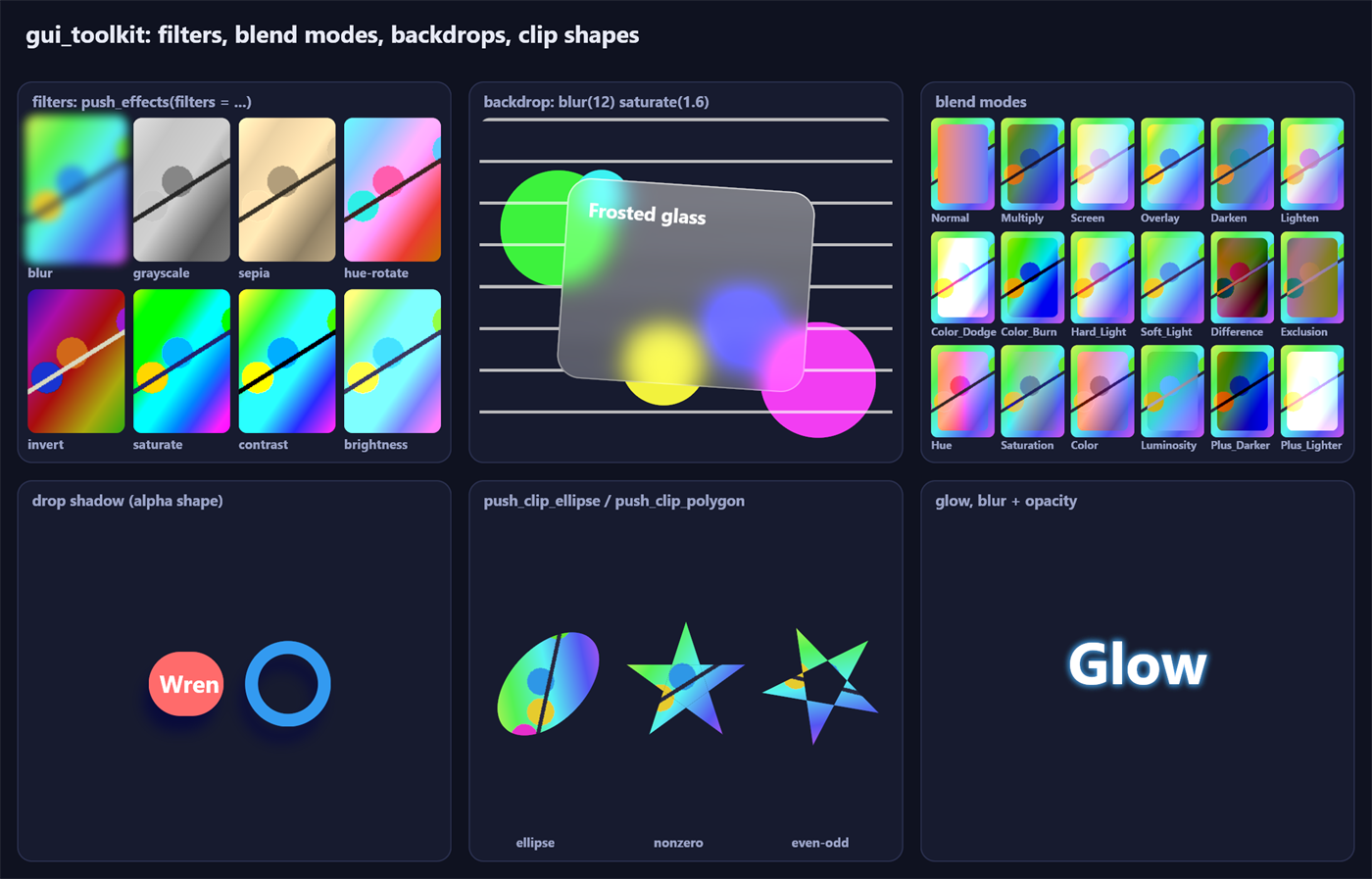
fx := draw.Layer_Effects{
	alpha   = 0.9,
	filters = {draw.filter_blur(4), draw.filter_drop_shadow({0, 6}, 5, draw.srgb(0, 0, 0, 0.5)), draw.filter_sepia(0.6)},
	blend   = .Multiply,
}
draw.push_effects(dc, card, fx)   // `card`: local bounds of what is drawn (the filters' spread is added)
draw.rect(dc, card, color, 12)
draw.text(dc, font_id, 15, pos, white, "Filtered")
draw.pop_layer(dc)
push_effects is push_layer with filters and a blend mode, applied in the CSS order: filters, then opacity, then
the blend with what is already drawn. push_layer(dc, bounds, alpha) is push_effects with only an alpha.
| Filter | CSS | Notes |
|---|---|---|
filter_blur(sigma) | blur() | gaussian, standard deviation in local units (follows the transform) |
filter_drop_shadow(offset, sigma, color) | drop-shadow() | the blurred alpha of what is drawn, moved, in color, under it. CSS gives a blur radius: sigma = radius / 2 |
filter_brightness, filter_contrast, filter_grayscale, filter_sepia, filter_saturate, filter_hue_rotate (radians), filter_invert, filter_opacity | the functions of the same name | 4 x 5 color matrices of Filter Effects 1 §13 |
filter_matrix(m) | feColorMatrix | any Color_Matrix (row-major 4 x 5 on straight values) |
- Colors are filtered in sRGB, on straight values for the matrices (each result clamped, so
brightness(3) brightness(0.5)is not the identity) and premultiplied values for blurs, as browsers compute them; a linear layer is converted once at each end of the chain, an sRGB layer not at all. filter_is_identity(f)tells filters that change nothing (brightness(1),blur(0)...):push_effectsskips them, and a chain of identities runs no pass.filters_outset(m, filters)is how far they spread content, in screen pixels (left, top, right, bottom); the layer is grown by it, and so is the area whose content may spread into the visible part.- Blur: two separable passes, taps folded in bilinear pairs. Above
render.set_blur_sigma_limit(8 screen pixels by default) the image is first reduced by 2, 4 or 8 in one pass (box averages through bilinear taps; 16 and more in two), blurred there (the variance of the reduction and of the bilinear resampling taken off the gaussian's), and stays reduced: the next pass, or the composite (render.FLAG_SCALED), samples it back up. The cost per pixel is bounded whatever the radius;tests/gpufxkeeps the result within 2.5 % of coverage of the exact gaussian (0.6 % on average) from sigma 3 to 30. What lies outside the layer is transparent. - Color matrices: up to
render.MAX_COLOR_MATRICESconsecutive ones run in one pass; those that end a chain are applied by the composite itself (render.FLAG_MATRIX, matrices in the frame's gradient table): a layer with only color filters runs no pass at all. - Drop shadow: the blur of the input's alpha, then one pass that moves it, tints it and puts the input on top.
- Pass targets are not cleared: a pass writes its region and a one-texel transparent ring past it, and reads no
further. Results are stored as
render.set_filter_precisionsays:.Half(fp16, the default) or.Unorm8(sRGB-encoded 8 bits, as browsers keep them: half the memory and bandwidth).
Kept results (src/draw/layer_cache.odin). Give a layer cache_id (its identity), cache_key (a signature of what
you draw in it) and cache_anchor (the screen point its content moves with): once the same key came two frames in a
row, the filtered result is kept, and while the key, the filters run by passes, the transform's linear part, the
anchor's fraction and the bounds relative to the anchor stay the same, push_effects returns false (skip the
content) and pop_layer composites the kept texture, moved by the anchor's whole-pixel moves (scrolling). Opacity,
blend mode and trailing color matrices are applied by the composite: animating them keeps the result. With a blend
mode, composited into the opaque frame, cache_under (a signature of what lies under) keeps the blended pixels
themselves: no copy, layer or blend while both keys hold. backdrop_capture / backdrop take the same three
parameters (the key describing what lies under the rect). set_layer_cache(dc, budget_bytes, max_layer_px,
idle_frames) (64 MB, 4 Mpx, 600 frames by default; 0 bytes turns it off), layer_cache_stats, layer_cache_forget,
layer_cache_clear. A lost device or an emptied pool (render.targets_generation) drops everything. push_mask takes
the same fields and returns false likewise: the kept result has its mask in it (skip the content and the mask layers;
mask_layer does nothing then), so cache_key must cover the mask layers too. Trailing matrices of a masked layer stay
live only when they commute with the mask (every CSS filter function does); others run before the mask.
mask_edge_fade(dc, r, {left, top, right, bottom}), after the content of a push_mask, draws the mask that fades the
content out over those widths at the edges of r (0: that edge stays opaque). A ui box gets it with edge_fade in
ui.next (with .Clip): a list that scrolls fades out where it goes on.
GPU profile (src/render/gpu_profile.odin): render.set_gpu_profile(r, true) puts a timestamp after each step of
frame_submit (a run of draw calls into one target, a clear, a copy, a filter pass); render.gpu_profile(r) gives,
a few frames later, the time, count, pixels written and estimated traffic of each kind of step
(Gpu_Step), the render targets bound and the slowest steps. detail = true times every draw call (batch, instance
count, kinds, flags, scissor of the slowest).
Blend modes (Blend_Mode, CSS Compositing 1): Normal, Multiply, Screen, Overlay, Darken, Lighten,
Color_Dodge, Color_Burn, Hard_Light, Soft_Light, Difference, Exclusion, Hue, Saturation, Color,
Luminosity, and the composite operators Plus_Darker, Plus_Lighter. When the layer is composited, what lies
under it in the enclosing layer (or the frame) is copied (Op.Copy into render.acquire_snapshot), and the
composite instance (render.FLAG_BLEND) computes the spec's formulas on straight sRGB values and writes the result
(its batch draws without hardware blending; clip shapes around it still apply). A blend sees only what was drawn in
its enclosing layer: open a layer to make an isolated group.
Backdrops
draw.backdrop(dc, glass, radii, {draw.filter_blur(12), draw.filter_saturate(1.6)})   // frosted glass
draw.rect_corners(dc, glass, tint, radii)                                            // then the panel itself
backdrop_capture(dc, r, filters) copies what the current target (frame or layer) holds under the screen bounds of
r (cut to the current clip), filters it with edges repeated (a blur does not darken the borders), and returns a
Backdrop; backdrop_draw(dc, b, r, radii) draws it clipped to the rounded rect r under the current transform,
clips and alpha (render.FLAG_SCREEN: texels are screen pixels). backdrop does both. Capture before opening a
layer and draw inside it to fade the backdrop with the element (CSS backdrop-filter with opacity).
Cost of effects
Measured with examples/effects (--bench=200, -define:GPU_TIMING=true, 1280 x 820 window at 125 %, release
build):
| Scene | Layers | Filter passes | Pooled targets | end_frame (CPU) | GPU |
|---|---|---|---|---|---|
| demo page (8 filtered thumbnails, frosted glass, 18 blend modes, shadow, clips, glow) | 28 | 22 | 8 (6.5 MB) | 0.03 ms | 0.42 ms |
| 12 cards: frosted backdrop (blur 12) + drop shadow + sepia, full window | 12 | 108 | 11 (9.6 MB) | 0.06 ms | 2.2 ms |
| 40 cards, same | 40 | 360 | 11 (5.0 MB) | 0.18 ms | 2.0 ms |
With kept results (examples/effects --bench=300, 2240 x 1400, GPU p50 under the per-step profile; the stress cards' content is
kept, their backdrops move): demo page 2.29 → 2.28 ms (21 layers, 11 passes instead of 28 and 20); 40 cards
4.61 → 2.91 ms (0 layers drawn, 120 passes instead of 360), 4.21 ms without kept results.
Blend spaces
Colors given to draw are always linear (draw.srgb, draw.hex convert). The blend space
(render.Blend_Space) says where they are mixed: alpha blending, antialiased edges, interpolation of corner colors,
image filtering and mips, layer composites.
Linear (default) | Srgb | |
|---|---|---|
| mixes | linear light (physically correct) | sRGB-encoded values, as every web browser (CSS Color 4, Compositing 1) |
rgba(0, 0, 0, .5) over white | 188 | 128 |
| frame render target view | B8G8R8A8_UNORM_SRGB (the hardware encodes) | B8G8R8A8_UNORM (the shader writes sRGB values) |
| RGBA textures | R8G8B8A8_UNORM_SRGB, premultiplied in linear light | R8G8B8A8_UNORM, premultiplied on sRGB values |
| translucent window | fp16 scRGB swap chain | 8-bit premultiplied sRGB swap chain (color space set explicitly) |
| filters, blend modes | converted to sRGB and back at the ends of a chain | computed as they are (no conversion) |
text (default Text_Rendering) | coverage^0.8 blended in linear light (the toolkit's historical look) | Chromium on Windows: Skia's sRGB curve, contrast 1.0 |
render.init_window(&r, win, size, space = .Srgb)            // or render.init_offscreen(&r, size, space = .Srgb)
render.set_blend_space(&r, .Linear)                    // later, between frames
draw.push_effects(dc, bounds, {alpha = 1, space = .Srgb})   // a layer of its own space
prev := draw.set_interpolation(dc, .Srgb) // CSS gradients: sRGB whatever the frame's space- Per renderer:
render.init(..., space),render.init_offscreen(..., space),render.set_blend_space(recreates the frame's view, switches a translucent window's swap chain format, releases pooled targets, resets the text rendering to the space's default),render.blend_space. - Per layer:
Layer_Effects.space(Inherit,Linear,Srgb): the layer's draw calls blend in it; its composite blends in the enclosing target's space (an opaque layer of one space inside a frame of the other is exact).draw.blend_space(dc)is the space of what is drawn now. Each target's space goes to the shader in its constant buffer (target_space). - Interpolation:
draw.set_interpolation(dc, .Target | .Srgb | .Linear)chooses where the corner colors ofrect_cornersare interpolated (render.FLAG_LERP_SRGB/FLAG_LERP_LINEARper instance). Colors are interpolated premultiplied (a transparent corner does not darken the others), as CSS gradients are. - Textures are stored in the renderer's space when created (
render.texture_space); an instance drawing one carriesrender.FLAG_TEX_SRGBwhen its texels are sRGB values, and the shader converts when the texture's space and the target's differ (afterset_blend_space, existing textures keep working). The same flag marks layer composites and backdrops of sRGB layers. read_pixelsreturns 8-bit sRGB in both spaces;frame_begin's clear color is linear (premultiplied) in both.
Text
Glyph coverage becomes alpha through render.Text_Rendering (render.set_text_rendering, per renderer):
Text_Rendering :: struct { curve: Text_Curve, gamma, contrast, coverage_exponent: f32 }
Text_Curve :: enum u8 { None, Srgb, Power }
The coverage is raised to coverage_exponent, then corrected as Skia does (SkMaskGamma, what Chromium uses): the
text's luminance s and a background guessed as its opposite d = 1 - s are taken through the curve (Srgb: the
sRGB transfer function, Skia's SK_GAMMA_SRGB; Power: x^gamma, Skia's SK_GAMMA_EXPONENT); the coverage a is
boosted, a' = a + (1 - a) * contrast * Ld * a (the contrast fades out as the guessed background gets dark), the
wanted color Ls * a' + Ld * (1 - a') is taken back through the curve, and the shader uses the coverage that makes the
target's own blend (sRGB values or linear light) give it. With the same settings, text therefore has the same weight in
both spaces (tested). The per-glyph terms are computed by the vertex shader; the pixel shader adds one curve
evaluation.
What Chromium does on Windows (chromium skia/BUILD.gn: SK_GAMMA_SRGB, SK_GAMMA_CONTRAST=1.0 since Chrome 132; the
ClearType tuner's registry values replace them when present): TEXT_RENDERING_SRGB, the default of the Srgb space.
Measured against Edge on the same page (Segoe UI 15 px at 175 %): ink per pixel of text width within 2 % for black on
white and for light on dark, where plain sRGB coverage is 4 % heavier and 17 % lighter respectively. Remaining
differences came from the rasterizer: at the time of this measurement stb_truetype, it is now DirectWrite in grayscale; Edge uses ClearType (font.Settings.subpixel_text here, see text.md).
Linux Chromium's values are {curve = .Power, gamma = 1.2, contrast = 0.2}.
The UI in the sRGB space
The ui package's translucent colors (hover tints, focus glow, sheens, scrollbars, theme entries with an alpha,
disabled fading) are tuned for linear light. ui.apply_palette(t, p, space) and ui.tuned(color, over) change their
alpha so they look the same over the theme's background (draw.alpha_like_linear: luminance match), and draw_tree
interpolates the UI's gradients in linear light: a UI looks the same in both spaces, except antialiased edges and text.
examples/fidget has the switch in its Settings dialog (and --blending=srgb); examples/effects and
examples/transforms take --srgb.
Cost
Measured with -define:GPU_TIMING=true (minimum of 4 runs, GPU p50): examples/effects --stress=12 1.25 ms (0.5.0),
1.19 ms (Linear), 1.20 ms (Srgb); examples/transforms 0.47 / 0.49 / 0.40 ms; --stress=2000 0.291 / 0.288 / 0.285
ms. The shader work added (a division by the interpolated alpha, a conversion when spaces differ, the text curve) is
below the run-to-run noise.
Retained drawing: pictures
pic: draw.Picture
draw.picture_begin(dc, &pic)                 // what is drawn now is recorded, not drawn
for c, i in cards {
	draw.push_transform(dc, spin(c))         // while recording, a pushed transform is a slot of the picture
	slots[i] = draw.current_slot(dc)
	draw.rect(dc, c.rect, c.color, 8)
	draw.text(dc, font_id, 13, c.pos, draw.WHITE, c.label)
	draw.pop_transform(dc)
}
draw.picture_end(dc)

// every frame
for c, i in cards { draw.picture_set_slot(&pic, slots[i], spin(c)) }   // move content without recording
if draw.replay(dc, &pic, draw.affine_translate({0, -scroll})) == .Stale { /* record again (see below) */ }
A picture holds instances, clips, gradients and transform slots in its own space. Its first replay uploads them to
persistent GPU heaps (render.Heap_Kind: instances, slots, clips, polygon points, gradients; first-fit ranges, grown
by a GPU copy); later replays cost one draw call per batch of the picture (a batch ends where a clip or an image
changes, as for immediate drawing) and a small constant buffer, whatever the number of instances.
- A replay draws under
mafter the current transform, faded by the alpha stack, cut by the clips pushed around it, in the frame's order: immediate drawing and replays interleave with exact z order, inside layers too. It returns.Culledwhen nothing can show (its bounds miss the clip; nothing is uploaded),.Stalewhen it must be recorded again (below),.Drawnotherwise. - Slots: transforms pushed while recording (
push_transform,push_scale) become slots, nested like the stack.picture_set_slot(pic, k, local)changes slotkrelative to its parent; its descendants follow. Only the changed range of slots is uploaded again.push_slot(dc, k)draws in an existing slot again during the same recording. - The same pixels: under a uniform scale + translation (
affine_is_scale_translateof replay matrix x slot) the vertex shader bakes positions exactly asdrawbakes them on the CPU, so a picture replayed at an integer translation is identical to direct drawing, byte for byte (tested). Under rotations and skews the transformed path is the same as direct drawing; matrices are composed in another order (a level of 8 bits on rare edge pixels). - Clips recorded in a picture live in the space of their slot. A
push_clip(plain rect) becomes the scissor at replay when the picture is under a uniform scale + translation (exact, free), a per-pixel shape otherwise, as when drawn directly. - Text (glyph runs: shaped positions, subpixel positions, color glyphs) keeps the glyph atlas positions it was
recorded with, at the raster size of its scale (
picture_begin'sraster_scaletimes the slot's scale); positions are baked on the pixel grid only at the picture's own scale. The picture remembers the atlas pages its glyphs are on with their epoch (Picture.pages,font.Page_Ref). It is stale when one of those pages was reused for other glyphs (only the pictures on that page: an eviction elsewhere costs nothing), when the text rendering settings changed (font.set_settings,font.clear_atlas), or when a text would be rasterized at another size (scale beyondTEXT_RASTER_TOLERANCEchanged): replay returns.Stale,picture_staletells beforehand. A picture that is not stale marks its pages as used by the current frame: they are not reused before the frame is drawn. Batches of a picture remember which gray / color page they sample (Batch_Bounds.gray,.color) and bind the replaying context's textures of those pages. - Images are referenced by texture handle. Offscreen effects are not recordable:
push_layer/push_effectsfall back to the alpha alone andbackdrop_capturereturns nothing while recording; apply effects around a replay. - Memory:
set_retained_budget(dc, bytes): past it, pictures not drawn in the current frame give their ranges back, least recently drawn first, and upload again from their recording (kept on the CPU) when drawn next.retained_bytestells what is used and reserved.picture_releasegives the GPU ranges back explicitly,picture_destroyfrees everything (call it before freeing thePicture).
Measured with examples/transforms --stress=N --bench=200 (-define:GPU_TIMING=true, release, 2244 x 1489):
| Scene | Immediate: draw calls (CPU) | Retained: CPU per frame | GPU (immediate / retained) |
|---|---|---|---|
| 2,000 rotating cards (14,890 instances) | 1.71 ms | 0.07 ms (2,000 slots changed) | 0.53 / 0.42 ms |
| 8,000 rotating cards (62,890 instances) | 7.54 ms | 0.26 ms (8,000 slots changed) | 1.15 / 1.16 ms |
| 8,000 cards, still | 6.61 ms | 0.09 ms | 1.05 / 0.76 ms |
Gradients
draw.gradient(dc, r, draw.Gradient{
	kind = .Radial, center = {60, 40}, radii = {60, 40}, space = .Oklch, hue = .Longer,
	stops = {{color = draw.hex(0xff0000ff), pos = 0}, {color = draw.hex(0x0000ffff), pos = 1}},
	tile = {{0, 0}, {120, 80}}, repeat = {true, true}, dither = true,
}, radii = {8, 8, 8, 8})
One instance (render.KIND_GRADIENT) per gradient, filled into a rounded rect like rect (so it follows transforms,
clips and pictures); the color is evaluated per pixel from an entry of the frame's (or the picture's) gradient table.
- Kinds:
Linear(t = 0 atstart, 1 atend),Radial(t = 1 on the ellipse ofradiiaroundcenter),Conic(t = 0 atangle, radians clockwise from up, one turn = 1).repeatingrepeats the stops from the first position to the last (a period of zero paints the average color, CSS Images 4 §3.6). - Stops: linear colors with straight alpha, positions in t (any value, never decreasing), and a transition hint to
the next stop (
has_hint,hint= where in the interval the colors mix half and half: CSS's hint exponent). - Interpolation (
Gradient_Space): premultiplied, in sRGB values (CSS default), linear light, Oklab, Oklch, CIE Lab and Lch (D50, Bradford), HSL, HWB; polar spaces followHue_Method(shorter, longer, increasing, decreasing) and powerless hues (grays) take their neighbor's. The colors are converted on the CPU once, back per pixel. - Tiles:
tileis one copy of the gradient (geometry relative to its corner);repeatper axis,spacingbetween copies (CSS background-repeat: space); without repeat, outside the tile is transparent. A zero tile: the gradient spans the drawn rect. - Dithering: triangular noise of one 8-bit level in the target's encoding, against banding of slow ramps.
Box shadows
draw.box_shadow(dc, shape, radii, sigma, color, hole = border_box, hole_radii = border_radii)   // CSS box-shadow
draw.inset_shadow(dc, padding_box, padding_radii, hole, hole_radii, sigma, color)              // CSS inset
The gaussian blur (standard deviation sigma, CSS: half the blur radius) of a rounded rect with per-corner circular
radii, computed analytically per pixel (render.KIND_SHADOW): the convolution is the integral over rows of
Phi(left edge) - Phi(right edge); each edge is straight (a product of two erf) except along its two corner arcs, which
are integrated over their angle (smooth there, unlike along y) at 16 samples, only where the gaussian matters. Against
a numeric convolution (tests/shadows): within 1 level of 8 bits for sigma 3 to 10, 1.7 levels at sigma 0.8. An
outer shadow is not drawn inside hole (CSS cuts it out of the border box: correct under translucent boxes); an inset
one is drawn inside the padding box, outside the blurred hole. Under a third of a screen pixel of blur the shape is
drawn with an antialiased edge.
Device loss
When the GPU is reset or removed (driver update, TDR), Present fails: the renderer marks itself lost
(render.device_lost). The next draw.begin_frame (or render.frame_begin) calls render.recover: a new device,
swap chain (or offscreen target), pipeline, and every texture re-created under the same handle with its size and
format, contents cleared. render.Renderer.device_generation changes: owners of images upload them again
(draw.begin_frame uploads the glyph atlas pages again whole from their CPU copy: glyphs stay where they were and
pictures with text stay valid); the retained heaps are emptied
(heap_generation), pictures upload again from their recording at their next replay. If no device can be had yet,
frames draw nothing and recovery is tried again. A texture the new device refuses draws nothing and says {0, 0} from then on, until destroy_texture frees its handle. render.simulate_device_loss exercises the path in tests.
Offscreen rendering (tests, export)
render.init_offscreen(&r, {64, 64}, warp = true)   // no window; WARP = software rasterizer, deterministic
// ... draw.begin_frame / render.frame_begin / draw / draw.end_frame / render.frame_end as usual
pixels := render.read_pixels(&r)                    // RGBA8, sRGB, top-down
render.destroy(&r)                                  // releases every GPU object
tests/layers uses it to check group opacity against direct drawing pixel by pixel; tests/effects checks every
filter and blend mode against the formulas of the specifications on flat colors, the blur's energy, symmetry and
gaussian profile, the antialiased coverage of ellipse and polygon clips, backdrops, and target reuse;
tests/blend_space checks blending, edges, gradients and their interpolation, textures (premultiplication,
filtering, mips, a texture of the other space), layers of either space, set_blend_space and the text correction.
The first two run in both spaces.
Images
tex := render.create_texture_rgba(&r, w, h)                 // mips = true by default
render.update_texture_rgba(&r, tex, 0, 0, w, h, pixels)      // RGBA8, sRGB, straight (not premultiplied) alpha
draw.image(dc, tex, dst_rect)                                 // whole texture
draw.image(dc, tex, dst_rect, src = {{0, 0}, {32, 32}}, tint = draw.WHITE, radius = 8)
draw.image_corners(dc, tex, dst_rect, src, tint, radii)      // per-corner radii
draw.image_tiled(dc, tex, dst_rect, tile_rect)               // repeat (background-repeat)
render.destroy_texture(&r, tex)| Proc | Notes |
|---|---|
render.create_texture_rgba(r, w, h, mips := true) -> Texture | 0 when out of range (render.max_texture_size(r), 16384 on feature level 11) |
render.update_texture_rgba(r, tex, x, y, w, h, pixels, stride := 0) | sub-rectangle upload; stride in bytes (0 = w * 4) |
render.destroy_texture(r, tex) | the handle may be reused by a later create |
render.texture_size(r, tex) -> [2]int | |
draw.image(dc, tex, dst, src: Rect = {}, tint: Color = WHITE, radius: f32 = 0) | src in texels, zero = whole texture |
draw.image_corners(dc, tex, dst, src, tint, radii: [4]f32) | |
draw.image_tiled(dc, tex, dst, tile: Rect, tint = WHITE, radii = {}) | one copy of the whole texture on tile, repeated, cropped to dst |
- Color: pixels are sRGB and not premultiplied (what PNG / JPEG decoders and the web produce). The upload
premultiplies them in the texture's blend space (see Blend spaces): in linear light, stored as
R8G8B8A8_UNORM_SRGB(the sampler decodes to linear before filtering, so filtering and mips happen in linear light), or on the sRGB values, stored asR8G8B8A8_UNORM(filtering and mips on sRGB values, as browsers). Either way the values are premultiplied: no dark fringes around transparent pixels.tintis a linear color with straight alpha, like every other color indraw; the alpha stack applies. - Filtering: trilinear. Mips are regenerated (
GenerateMips) before the first frame that follows an update. Without tiling, sampling never reads outsidesrc(sprite sheets do not bleed). - Tiling uses the hardware wrap mode on the whole texture: seamless, one instance, the tile can be any size and
offset (scrolling backgrounds). For one-axis repeat make
dstone tile tall or wide. Repeating a sub-rectangle of a texture is not supported in one draw: draw oneimageper tile. - Batching: glyphs read a gray atlas page (t0) and images their own texture (t1), so text, shapes and one image share a batch; switching to a different image (a color glyph page is one), another gray page or a different scissor starts a new draw call.
Cost
Rect_Inst grew from 128 to 144 bytes (transform index, clip index, flags). Measured with examples/transforms
(--stress=N --bench=300, -define:GPU_TIMING=true, 2244 x 1489 window, release build):
| Scene | Instances | Transforms | Draw calls (CPU) | end_frame (upload + submit) | GPU |
|---|---|---|---|---|---|
| demo page | 319 | 9 | 0.06 ms | 0.01 ms | 0.56 ms |
| 2,000 cards, flat (CPU-baked path) | 14,890 | 0 | 1.50 ms | 0.086 ms | 0.51 ms |
| 2,000 cards, each rotated | 14,890 | 2,000 | 1.62 ms | 0.090 ms | 0.64 ms |
| 8,000 cards, flat | 62,890 | 0 | 6.47 ms | 0.34 ms | 1.05 ms |
| 8,000 cards, each rotated | 62,890 | 8,000 | 7.09 ms | 0.50 ms | 1.08 ms |
The widget gallery (fidget --bench=400, pages 0 and 2) measures the same as 0.3.2 (0.60 / 1.02 ms per frame).
Limits
- A rotated or skewed
push_clip/push_clip_roundedcosts a little pixel-shader work for every pixel drawn inside its bounds; more than 8 nested clip shapes are ignored (the outermost 8 apply). - Soft shapes (shadows,
soft > 1) blur in local units: under a strong downscale the blur can drop below a pixel. - Rotated text is the glyph bitmap at its layout size, sampled bilinearly (slightly softer than axis-aligned text).
- The transform stack is 2D affine. Perspective (3D) is done with planes (
push_plane,draw_planes, above), not withpush_transform. - A layer costs one render target of its size and a full-screen-sized fill at most; dozens of large layers per
frame are expensive (callers should fall back to
push_alphawhen the group holds a single primitive, which is exact). - Filters run in screen space: a blur under a non-uniform scale or a skew is isotropic (the transform's mean scale), a drop shadow's offset follows the transform exactly.
- Every effect except the color matrices reads pixels around the one it writes: a layer whose bounds are cut by
the window edge blurs as if nothing lay past
bounds+ the filters' reach outside the visible area. - In the
Linearblend space (the default) translucent content composited over other content is lighter than in a web browser (50 % black over white: 188 instead of 128); use theSrgbspace for web content (see Blend spaces). - Filters always compute on sRGB values (CSS shorthand filters as browsers run them); SVG's
color-interpolation-filters: linearRGBis not available. rect_cornersinterpolates corner colors in sRGB or linear light only;draw.gradienthas the other spaces.
Offscreen drawing and readback
offscreen_begin(dc, {w, h}) opens a transparent target of its own: what is drawn until offscreen_end(dc) lands at
(0, 0)..(w, h) of it, is never shown, and is not cut by the window (an element off the screen or under others paints
whole). offscreen_end returns a render.Readback_Id; after the frame, render.readback_poll(r, id) gives the
pixels (straight RGBA8, sRGB values, alpha kept) once the GPU copied them (Pending until then, Ready once,
Failed after a lost device; the same on both backends: a staging texture under Direct3D 11, a mapped buffer under wgpu); render.readback_release drops one no longer wanted. Uses:
drag images, captures of one element, toBlob-like exports.
Partial redraw (damage regions)
When only a small part of the window changed since the last frame (a caret, a hovered control, a progress bar, a video,
a local animation), the renderer can repaint only the changed rectangles instead of the whole window. The
application marks the changed boxes each frame; draw forwards them to the renderer (src/render/damage.odin):
draw.set_partial_redraw(dc, true)        // turn it on (off: the whole window every frame, the default)
...
draw.begin_frame(dc, size)
draw.damage_begin(dc)                     // open the region, once; nothing marked = draw and present nothing
draw.damage(dc, box)                      // a changed box (context coordinates, screen pixels)
draw.damage_padded(dc, box, pad)          // grown by `pad` (a shadow, a glow, a focus ring that bleeds past the box)
draw.damage_scrolled(dc, rect, delta)     // a scrolled view: redraws where the content was and where it is
... draw everything ...
draw.end_frame(dc)
The region is the union of the boxes, with near ones merged so it stays bounded. The renderer draws only the batches
that touch it into a kept target, which is then copied whole to the window: fewer pixels shaded, the same present. The
first frame of a region, a frame after one without a region and a frame that reads itself (a backdrop, a blend mode into the
frame) are drawn whole. See docs/webgpu.md "Partial redraw". A box must be grown by the reach of any effect that paints past it (damage_padded),
or the region will clip the fringe. Correctness is checked by draw.set_damage_verify(dc, true) (or
TOOLKIT_DAMAGE_VERIFY=1): every frame with a region is rendered in full too and the first differing pixel is reported;
render.damage_verify_differences counts the frames that differed.
draw.damage_stats(dc) returns the rectangles added and kept and the pixels covered, for diagnostics.
Automatic damage
A program that does not want to track its changes lets draw find them (src/draw/damage_auto.odin). It labels what it
draws with spans, and keeps one draw.Damage_Memory per window:
draw.begin_frame(dc, size)
draw.damage_auto(dc, &memory)             // compare this frame with the last one at end_frame
draw.damage_span_begin(dc, id)            // what is drawn from here belongs to span `id` (spans nest)
... draw ...
draw.damage_span_end(dc)
draw.end_frame(dc)                        // the region is built here, then the frame is submitted
draw.damage_memory_destroy(&memory)       // at the end of the window
At end_frame, each span is reduced to a digest: a hash of what decides its pixels (each instance with its transform, clip
shape and gradient resolved, the batch scissor, the textures with render.texture_version, the layer it is drawn into, the
filter and mask steps) and the screen rectangle its instances can reach (cut by the scissor and the layers around it; all of a
layer whose filters spread it). A span whose digest changed is damaged where it was and where it is, a new span where it is, a
gone span where it was. Content outside every span is span 0. A region begun by hand (damage_begin, damage) is kept and
added to. Nothing happens while partial redraw is off; the memory then forgets its frame.
These frames are damaged whole (draw.Damage_Auto_Stats.whole, a draw.Damage_Whole): the first one, another size, other
font settings or another device, draw.damage_whole(dc), a frame that copies a target (a backdrop, a blend mode), an
offscreen layer or a plane (their texels are not the screen's), and spans drawn in another order (a box raised above
another). The renderer damages the whole frame itself when the clear colour, the blend space, the text or corner settings
change (docs/webgpu.md "Partial redraw").
A custom draw needs nothing: what it draws is in the digest. A span whose pixels change while no instance does (a texture
written outside the renderer, a shader reading what it is not given) calls draw.damage_volatile(dc): it is redrawn every
frame. A replayed picture (draw.replay) is always redrawn where it lands: its content is not compared.
draw.damage_memory_reset(&memory) makes the next frame whole. memory.stats says how many spans drew, how many were
damaged, and why a frame was whole.
The ui package uses this for its whole tree: ui.set_partial_redraw(&state, true) (or Host.partial_redraw in host),
each box a span keyed by its key, ui.damage_stats(&state) for the counters.